

Ryan Sloan is a data scientist in Seattle. He writes about AI measurement and evaluation at Full Rank.
Copilot Gets a Seat in the Org Chart
Can Microsoft make workplace agents useful at scale?
Sep 25, 2026 · 7 min readUpdated Oct 16, 2026


If you’ve followed Mike Taylor’s coverage of Microsoft, you know the scale of what the company has been assembling: 80 products called “Copilot” at last count—powerful when configured correctly and locked down without a cooperative IT department. Ryan Sloan attended Microsoft’s latest launch to test the new unified Copilot app, which rolls chat, code, Office, and a persistent agent called Autopilot into one interface. He found that the controls that make Copilot trustworthy inside a big company are the same ones that keep it from finishing a routine task. Read on for his dispatch from Redmond.—Kate Lee
Was this newsletter forwarded to you? Sign up to get it in your inbox.
In August, Mike Taylor counted 80 Microsoft products called “Copilot.” Among them, he said, were some of the best tools for building agents—if you could navigate onboarding and enterprise IT administration.
At a launch event earlier this week in Seattle and Redmond, where I spoke with executives and briefly tried the app on the demo floor, Microsoft announced a new Copilot that combines chat, code, Office, and a persistent agent called Autopilot, replacing its separate consumer and work chat apps. Microsoft isn’t alone in attempting a unified interface for AI work, but its advantage is that the people it’s built for already spend their day in Outlook and Teams, with permissions their IT department set years ago.
Autopilot may be the most interesting piece of the new Copilot: It can work on its own and access most of what you can. Those permissions could make it useful and trustworthy inside a company, but they could also prevent it from completing an ordinary task. Microsoft’s own emphasis on evaluations (evals) at the launch event suggests that it is looking to its customers to define what good work looks like in their organizations and test whether Autopilot improves on current workflows.
The new app has three tabs:
- Home brings chat, delegated tasks, and Word, Excel, and PowerPoint into one place, making context available between them.
- Code lets non-developers build and share small apps within secure environments.
- Autopilot lets you create a persistent agent you can give a goal and set to work behind the scenes.
In one demo, it tracked and managed Black Friday inventory requests for a retailer. To avoid the compliance risks of ungoverned agents, Autopilot agents fit into your organization’s governance structure with their own permissions and are shown “reporting” to their owners in the org chart.
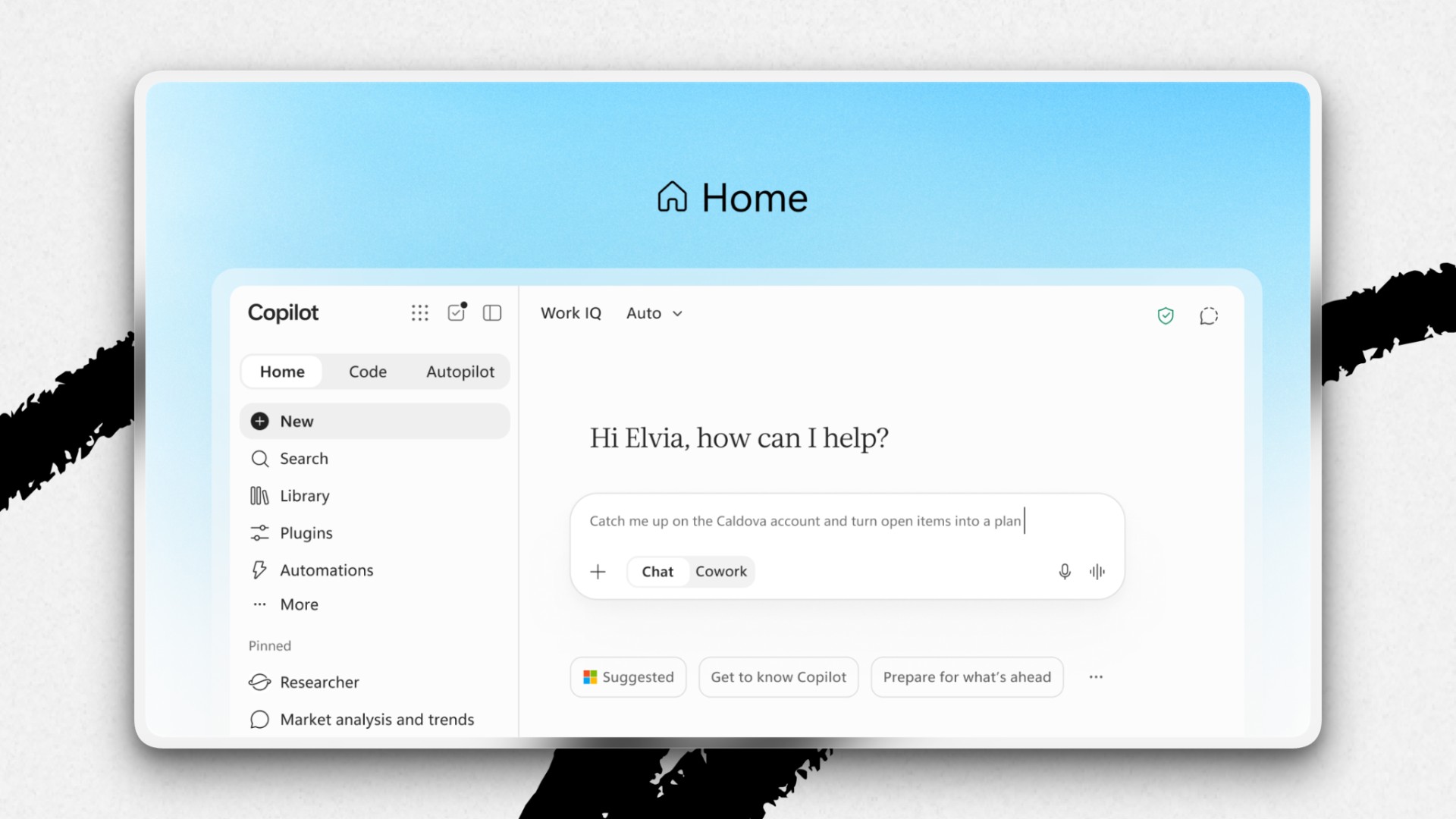
These capabilities are rolling out in previews and via Microsoft’s early-access program for AI features over the coming months.
What I learned on the demo floor
At the launch, CEO Satya Nadella said Copilot now works at every scale, from a single Excel cell to a summary of a week’s meetings, with the same memory of what you’re doing carried across all of it. That was the claim I wanted to test on the demo floor. Office inside Copilot holds up: Word, Excel, and PowerPoint open in the app, and Copilot knows which document you’re in and what you’re doing there. The old Copilot buttons couldn’t see past their own window. In a demo, we opened a PowerPoint deck inside Copilot, scrolled to slide 9, and returned to the chat to say, “Make this slide easier to read.” That was enough for Copilot to start reformatting the slide.
Then I made a request that went outside the team’s prepared demo: Pull a table from a Word document and drop it into a new tab in an Excel workbook. Copilot found both files but said it lacked permission to edit the workbook. A similar restriction prevented us from testing a handoff from Chat to Code. Such handoffs are central to the “one app” pitch, so I’d hoped to see one in action. In both cases, the team assured me that while the demo wasn’t set up for these tasks, they would work in the right configuration. This echoes what Mike observed in August: IT controls make Copilot safe for enterprises, but the customer’s setup will decide whether it works for a user on day one.
An agent that keeps working
“The new massive insider risk is the AI agent,” Nadella warned at the launch, explaining why Autopilot was designed to help it earn users’ trust. Autopilot draws on the last 30 days of a user’s work, their place in the org chart, and their calendar. It remembers personal preferences like a no-meetings morning and past corrections. These memories are meant to be private to the user, but the agent is identifiable when working with others, displayed under a name the user gives it, like “Dot (Ryan’s Autopilot).” A colleague can tag Dot in a Teams chat to find a meeting time or ask it a question.
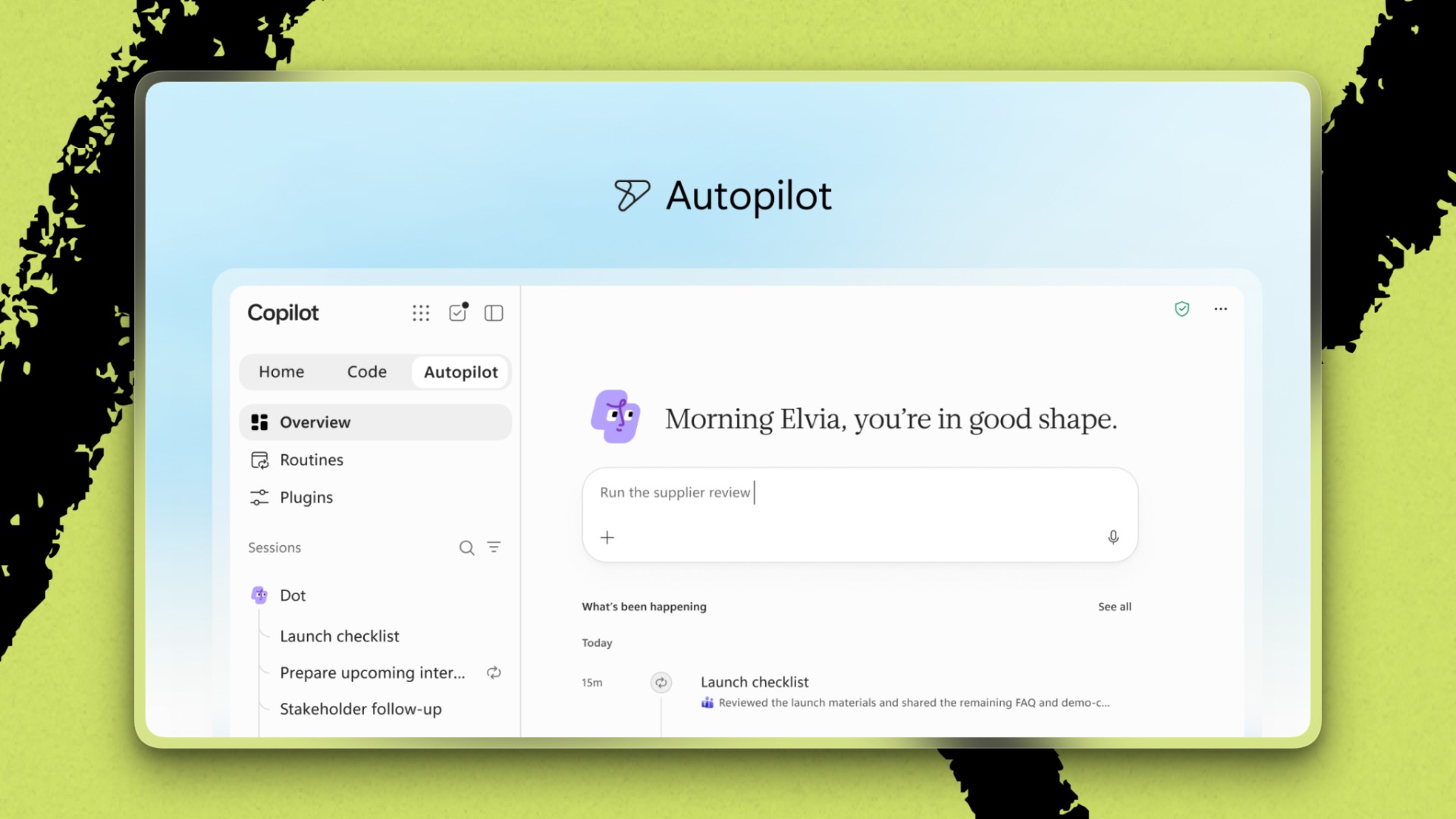
Autopilot can also run Routines: a daily briefing, or a standing job that keeps watch on a project while you’re doing something else. Charles Lamanna, executive vice president of Copilot, agents, and platform, has named his Autopilot Apollo and given it the same Outlook access his executive assistant has. He talks to Apollo almost entirely in Teams, the way he’d message a colleague. He gives it goals like ensuring he’s prepared for customer meetings, and it operates around the clock to identify those calls on the calendar and automatically summarize relevant context for him from Teams, email, and notes.
Always-on work has a cost. Autopilot runs on usage-based credits and is off by default. Lamanna envisions companies eventually having one Autopilot per person and one per group. To justify thousands of agents spending tokens around the clock, he said, Autopilot has to “clear a higher bar” than an AI tool that works only when a user asks it to.
What a higher bar means
At the launch, Microsoft spent a surprising amount of time on how customers should judge Copilot. That emphasis reflects an industry-wide turn toward evals, as Laura Entis reported yesterday. Nadella called for “evals specific to your company”: tests based on the work your people do, which you can use to compare models and measure performance. A general benchmark cannot tell an organization whether an agent improves one of its own processes.
Lamanna told me Microsoft runs about 16,000 internal evals. Each eval represents a common task or workflow they identified in usage data and is built by domain experts. The company also builds evals with customers. At a large consumer goods company, he said, a Microsoft team is identifying which tasks matter most to that business. The customer connects the necessary data, and Microsoft fixes the problems the tests uncover.
The customers who succeed at this, Lamanna said, have the person who does the job every day build the eval. They also “embrace the red.” A failing test tells you what to fix, and once it passes, you write a harder one. And before those customers let the agent try, they measure how the humans are doing the job now—tracking outcomes such as error rates or the time it takes a contract to get out the door—so the agent has an actual baseline to beat.
That standard should apply across the new Copilot. Each feature has to improve the work it promises to make easier. Office inside Copilot will eliminate much of the copying and pasting needed to give a chatbot context. Code addresses a pattern I’ve seen repeatedly: Someone builds a useful AI tool that works beautifully on their laptop, but no one else ever uses it. Microsoft wants sharing an app to be as easy as sending a PowerPoint deck. Autopilot is for the tasks that pile up when you’re not at your desk.
Microsoft already has what a company agent needs: your documents, conversations, and permissions. But when the demo couldn’t carry my work between apps, it showed why Microsoft may struggle to fulfill that promise. The controls meant to make Copilot trustworthy could also stop it from doing its job. Company-specific evals would let customers measure how reliably Copilot works within those guardrails—and whether it improves on the way its employees work today.
Ryan Sloan is a data scientist in Seattle. He writes about AI measurement and evaluation at Full Rank.
Everyone’s a builder now. Every All Access gets you the full membership plus the Builder Pack—$9,000+ in credits for the tools we build with.

See how good you are at using AI—and learn how to get better
Sign in to read for free and get your AI assessment prompt.
Continue with GoogleView all login options Continue with Google
 Sign in


